
Storyline Interactivity Samples
Problem
-
Solution
-
Audience, Tools, Responsibilities
-
Problem - Solution - Audience, Tools, Responsibilities -
Problem
eLearning that is simply reading on a screen can be boring and easy to skip through.
We’ve all experienced learning that is less than engaging. Perhaps you have felt the drowsiness that creeps in during a boring lecture, or the urge to go off camera in a virtual meeting. For self-paced eLearning, it doesn’t take long to figure out that you can set that up on your screen, do something else (“real work”), and come back to click Next every few minutes to check the box and show up on the “completed training” report.
If the goal is to change employee knowledge and skills, that’s not going to work! So, how do you get those employees to actually want to complete the training, and then to engage meaningfully with the instruction?
This is a complex question that is best answered with a holistic approach to design, where learners look forward to the training, recognize the value it has to their work productivity and satisfaction, and have the opportunity to check their knowledge and practice in a safe environment where remediation (when necessary) and reinforcement are built in. For the purpose of a portfolio, the easiest thing to show is the use of interactivity to keep learners attentive to the course. Learners are then empowered to pull the information at their own pace, rather than having it pushed at them in an effort to check a box.
Solution
Interactivity is one part of the solution—no matter what modality is used.
Think of a workplace learning experience you’ve found really valuable. Chances are, you knew how it would help you, either before you started or shortly after it began. You were able to connect the new things to what you already knew, or had new insights into misunderstandings you had previously. You may have had the chance to discuss those ideas with others participating with you, complete practice activities, or pass a test to show how much you learned. Ideally, you then had no trouble retaining that information and applying it to your work right away. That’s the goal for a well-designed and successful learning experience!
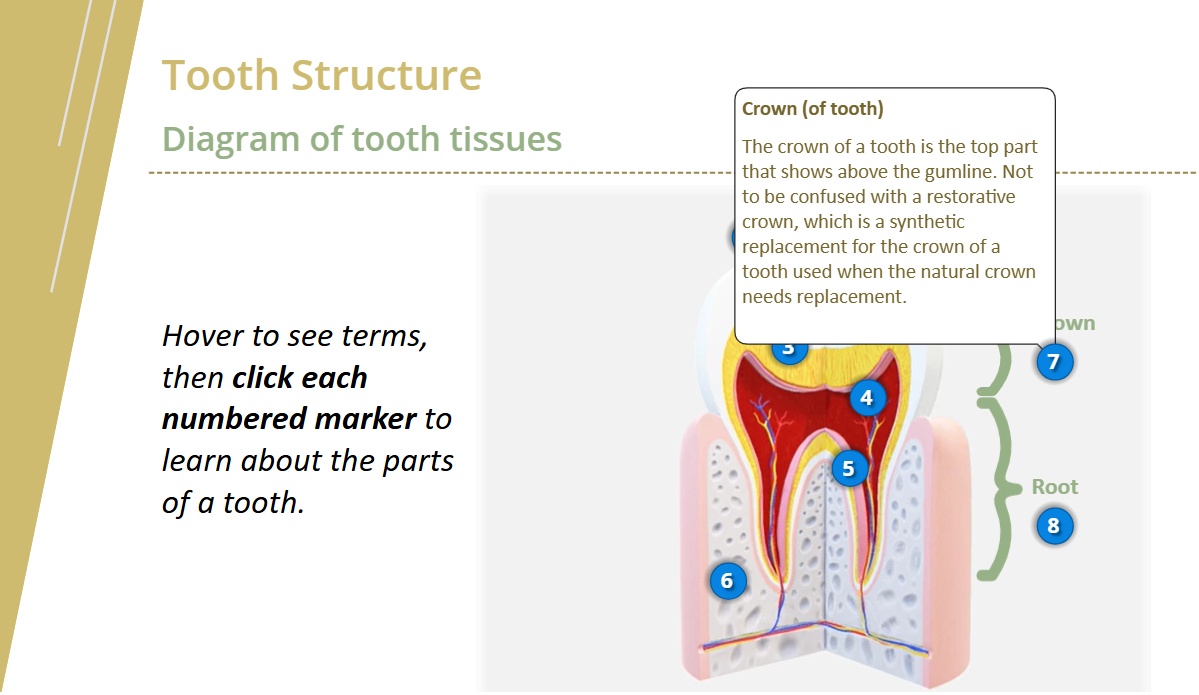
For self-paced eLearning, which is often completed on your own at a desk, engagement can be especially challenging. Thankfully, modern authoring tools support the designer’s ability to engage learners in a meaningful way and then to maintain engagement with interaction throughout the module. Gone are the days of scrolling pages of text with unrelated images of people smiling in the sunshine, as we now build solutions that show bite-sized pieces of information learners can pull out in context, with visuals that add to the understanding of topics. The Storyline sample linked above shows just a few examples that I’ve built in the past. Much more is possible, and in this age of rapid AI feature enhancements, capabilities evolve all the time. Use the Contact tab on this site to reach out to me if you’d like specific examples beyond what you see here.
Audience
Viewers of my portfolio.
Tools
Articulate 360 AI, leveraging stock photos and videos and AI Text to Speech. Vyond for embedded video samples.
Responsibilities
All work represented in the samples is my own. Often, an example represents my entry in the Articulate eLearning Heroes weekly challenges.